Why \w and \b never match Arabic
JavaScript's \w is defined as [A-Za-z0-9_]. Adding the u flag does not widen it to other scripts, so /\w/u.test("م") returns false. Because \b is defined in terms of \w, a word boundary never appears between two Arabic letters or between an Arabic letter and a space. /\bمرحبا\b/u fails against the string "مرحبا بالعالم".
The fix is to build the boundary yourself with lookbehind and lookahead over Unicode letters and marks:
const AR = "[\\p{L}\\p{M}]";function arabicWord(word) { return new RegExp(`(?<!${AR})${word}(?!${AR})`, "u");}arabicWord("كتب").test("اشترى كتب جديدة"); // truearabicWord("كتب").test("المكتبة"); // false — no substring hitIncluding \p{M} matters: without it, a diacritic directly after the word counts as a boundary and "كتبً" would match "كتب". Lookbehind is supported in every current browser (Safari added it in 16.4), so this works client-side as well as in Node.js.
Search input still needs normalizing first: the literal "كتب" will not match a voweled "كُتُب" because the marks sit between the letters. The normalization section below handles that.
Choosing a character class for Arabic
There are five common ways to say "Arabic" in a JavaScript regex, and they disagree on real characters. I tested each one against seven characters you will meet in production text:
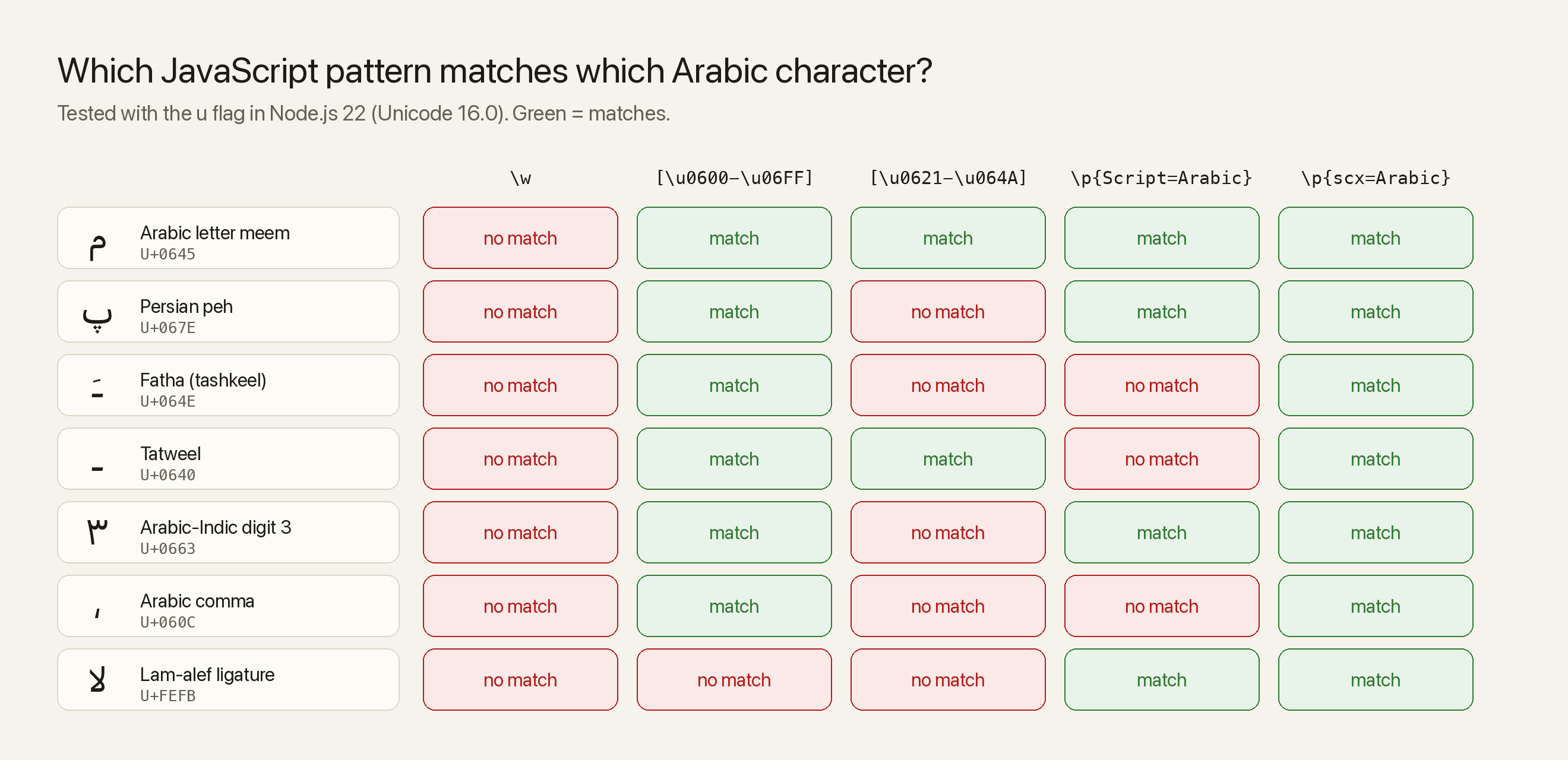
| Pattern | Matches | Misses | Use it for |
|---|---|---|---|
\w | Nothing Arabic | Everything | Never, for Arabic |
[\u0600-\u06FF] | The main Arabic block, including digits, marks and punctuation | Presentation forms such as the ligature ﻻ (U+FEFB) | A quick "contains Arabic" check |
[\u0621-\u064A] | Core letters | Persian and Urdu letters, marks, digits; it also matches tatweel (U+0640) by accident | Avoid: split it as [\u0621-\u063A\u0641-\u064A] if you need core letters |
\p{Script=Arabic} | Letters across Arabic, Persian and Urdu, Arabic-Indic digits, presentation forms | Tashkeel, tatweel, the Arabic comma ، and question mark ؟ | Letters and digits |
\p{scx=Arabic} | Everything in the test, including shared marks and punctuation | Nothing in this test | "Any character used in Arabic text" |
The surprise is the fourth row. Tashkeel marks have the Unicode script value Inherited, and tatweel and the Arabic comma have Common, because other scripts use them too. The Script_Extensions property (scx) lists every script a shared character is used with, which is why \p{scx=Arabic} catches them.
The u flag is not optional
Without the u flag, \p{L} is not a property escape. JavaScript reads it as the literal letter "p" followed by "{L}", so /\p{L}/.test("م") returns false and /\p{L}/.test("p{L}") returns true. There is no error. Every pattern in this article needs u or v.
Letters only, with set operations
The v flag (ES2024) adds set intersection, so "Arabic letters, not digits or punctuation" becomes one class:
const ARABIC_LETTER = /[\p{Script=Arabic}&&\p{L}]/v;const ARABIC_WORD = /[\p{Script=Arabic}&&\p{L}][[\p{Script=Arabic}&&\p{L}][\p{scx=Arabic}&&\p{M}]]*/gv;"مَرْحَباً بكم في Next.js ٢٠٢٦".match(ARABIC_WORD);// ["مَرْحَباً", "بكم", "في"]You cannot mix && with a plain union at the same level: [\p{Script=Arabic}&&\p{L}\p{M}] is a syntax error under v. Nest each intersection in its own brackets, as above. The word pattern uses scx for the marks, since tashkeel is not Script=Arabic.
Tashkeel, tatweel and string length
Tashkeel (تشكيل) is the set of optional marks written above or below Arabic letters to show short vowels, doubled consonants and the absence of a vowel. Most everyday text omits them, but names, religious text and teaching material often include them. A fully voweled word stores each diacritic as a separate code point after its letter. That breaks three things developers assume about strings.
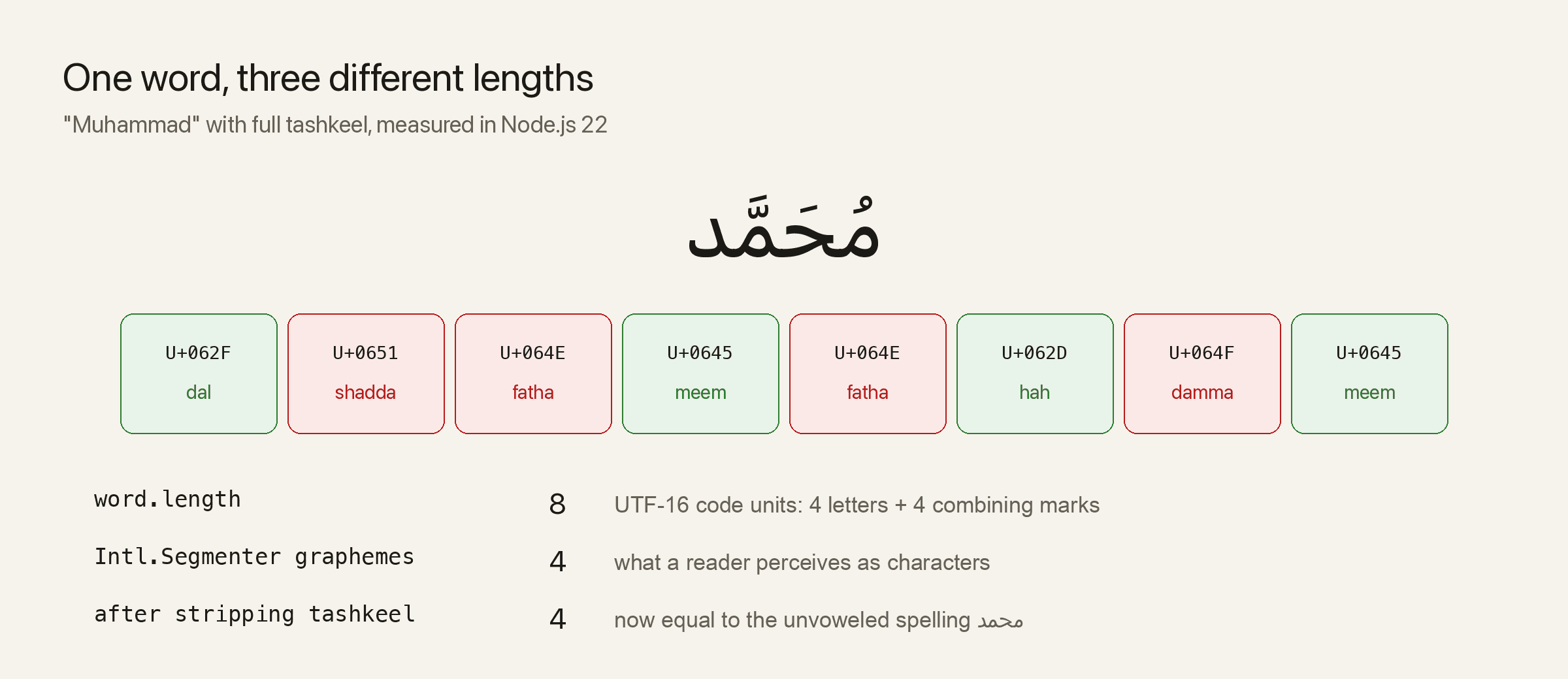
const word = "مُحَمَّد";word.length; // 8[...new Intl.Segmenter("ar", { granularity: "grapheme" }).segment(word)].length; // 4word.includes("محمد"); // falseword.replace(/[\u064B-\u065F\u0670]/g, ""); // "محمد"- Length limits. A 20-character limit on
.lengthrejects a 12-letter voweled name. Count graphemes withIntl.Segmenterwhen the limit is about what the user sees. - Substring search.
includesandindexOfcompare code points, so the voweled and unvoweled spellings never match until you strip marks. - Tatweel (ـ, U+0640) is a letter-like stretching character (
\p{Lm}), not a mark.\p{M}does not remove it, so strip it separately.
The range [\u064B-\u065F\u0670] covers the harakat, tanween, shadda, sukun, the extended marks up to U+065F and the dagger alef. Write it with \u escapes. Pasting the marks as literal characters into a range is hard to read and easy to get wrong, and the Arabic-Indic digits start right after it at U+0660.
Normalizing Arabic text for search
Search normalization maps every spelling a user might type to one form, applied to both the stored text and the query. This is the pipeline behind the site's Arabic text normalizer, with the real output of each step:
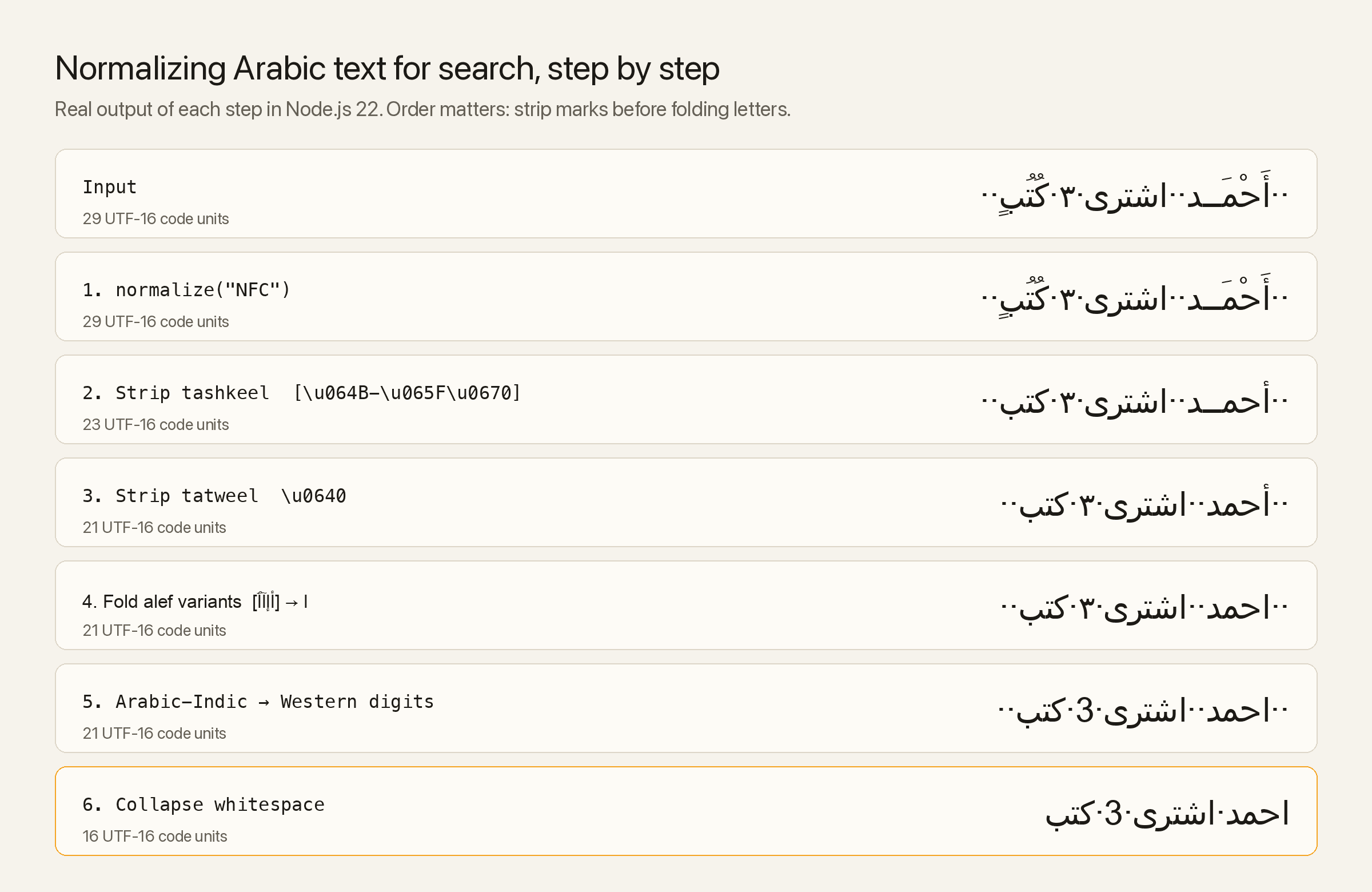
function normalizeArabic(text) { return text .normalize("NFC") .replace(/[\u064B-\u065F\u0670]/g, "") // tashkeel + dagger alef .replace(/\u0640/g, "") // tatweel .replace(/[\u0622\u0623\u0625\u0671]/g, "\u0627") // آ أ إ ٱ → ا .replace(/[\u0660-\u0669]/g, (d) => String(d.charCodeAt(0) - 0x0660)) .replace(/[\u06F0-\u06F9]/g, (d) => String(d.charCodeAt(0) - 0x06F0)) .replace(/\s+/g, " ") .trim();}normalizeArabic(" أَحْمَــد اشترى ٣ كُتُبٍ "); // "احمد اشترى 3 كتب"normalizeArabic("إسلام") === normalizeArabic("اسلام"); // trueUse NFC, not NFD, before stripping marks
Under NFD, precomposed letters with hamza split into a base letter plus U+0654 (hamza above), which sits inside the tashkeel range. Stripping marks after NFD therefore deletes hamza everywhere: أ becomes ا, which you may want, but ؤ becomes و and ئ becomes ي, which you usually do not. "مسؤول".normalize("NFD") with the marks stripped gives "مسوول". Normalize to NFC, strip marks, then fold only the alef variants you chose.
Decide what not to fold
Folding ة into ه and ى into ي raises recall, because users type them interchangeably, but it also merges real words. Keep those two as options per field, as the normalizer tool does, rather than always on. Never store the normalized form in place of the original: keep the original for display and index the normalized copy.
When you only need comparison, use Intl.Collator
If you are comparing or sorting, not building a search index, Intl.Collator with base sensitivity already ignores tashkeel and hamza on alef:
const c = new Intl.Collator("ar", { sensitivity: "base" });c.compare("أحمد", "احمد"); // 0c.compare("محمد", "مُحَمَّد"); // 0c.compare("على", "علي"); // 0c.compare("مدرسة", "مدرسه"); // -1, ta marbuta is still distinctThese results are from Node.js 22.12 with ICU 76. Collation data comes from the ICU version in each runtime, so test on the engines you ship to.
Arabic-Indic digits are not \d
Arabic text often uses Arabic-Indic digits (٠–٩, U+0660–U+0669), and Persian text uses the Extended Arabic-Indic set (۰–۹, U+06F0–U+06F9). Neither passes the checks most form code relies on:
/\d/.test("٣"); // false — \d is [0-9] only, even with u/\p{Nd}/u.test("٣"); // true — any decimal digitNumber("٣٤"); // NaNparseInt("٣٤", 10); // NaNNumber(normalizeArabic("٣٤")); // 34A phone or quantity field validated with \d rejects input from users whose keyboard types Arabic-Indic digits. Accept \p{Nd} in validation, convert to Western digits before parsing, and store the converted value. The Arabic numeral converter does the same mapping in both directions.
For output, Intl.NumberFormat picks the digits from the locale, and the default for plain ar has changed across CLDR releases. In Node.js 22.12, new Intl.NumberFormat("ar").format(1234.5) returns "1,234.5" while "ar-EG" returns "١٬٢٣٤٫٥". Set numberingSystem: "arab" or "latn" explicitly instead of relying on the locale default.
Reference: patterns to copy
All patterns below need the u flag (or v where noted) and were tested in Node.js 22.12.
| Task | Pattern |
|---|---|
| Contains any Arabic | /\p{scx=Arabic}/u |
| Arabic letter only | /[\p{Script=Arabic}&&\p{L}]/v |
| Tashkeel and dagger alef | /[\u064B-\u065F\u0670]/gu |
| Tatweel | /\u0640/gu |
| Arabic-Indic digits | /[\u0660-\u0669]/gu |
| Persian digits | /[\u06F0-\u06F9]/gu |
| Any decimal digit | /\p{Nd}/u |
| Whole Arabic word "X" | (?<![\p{L}\p{M}])X(?![\p{L}\p{M}]) with u |
You can test each of these against your own text in the Arabic regex patterns tool. For search on a whole site, the Arabic search normalization tool shows how query and index normalization fit together, and form validation patterns covers names, phone numbers and mixed input. If the page itself renders Arabic, start with lang="ar" vs dir="rtl".